1
2
3
4
5
6
7
8
9
10
11
12
13
14
15
16
17
18
19
20
21
22
23
24
25
26
27
28
29
30
31
32
33
34
35
36
37
38
39
40
41
42
43
44
45
46
47
48
49
50
51
52
53
54
55
56
57
58
59
60
61
62
63
64
65
66
67
68
69
70
71
72
73
74
75
76
77
78
79
80
81
82
83
84
85
86
87
88
89
90
91
92
93
94
95
96
97
98
99
100
101
102
103
104
105
106
107
108
109
110
111
112
113
114
115
116
117
118
119
120
121
122
123
124
125
126
127
128
129
130
131
132
133
134
135
136
137
138
139
140
141
142
143
144
145
146
147
148
149
150
151
152
153
154
155
156
157
158
159
160
161
162
163
164
165
166
167
168
169
170
171
172
173
174
175
176
177
178
179
180
181
182
183
184
185
186
187
188
189
190
191
192
193
194
195
196
197
198
199
200
201
202
203
204
205
206
207
208
209
210
211
212
213
214
215
216
217
218
219
220
221
222
223
224
225
226
227
| Shader "Unlit/DoubleTransparent"
{
Properties
{
_MainColor("MainColor",Color) = (1,1,1,1)
_specularColor("specularColor",Color) = (1,1,1,1)
_specularNum("specularNum",Range(0,20)) = 15
_MainTex("MainTex",2D) = ""{}
_BumpMap("BumpMap",2D) = ""{}
_BumpMapScale("BumpMapScale",Float) = 1
_AlphaScale("AlphaScale",Range(0,1)) = 1
}
SubShader
{
Tags{"Queue" = "Transparent" "IngnoreProjector" = "true" "RenderType" = "Transparent"}
Pass
{
Tags { "LightMode"="ForwardBase" }
ZWrite off
Blend SrcAlpha OneMinusSrcAlpha
Cull Front
CGPROGRAM
#pragma vertex vert
#pragma fragment frag
#include "UnityCG.cginc"
#include "Lighting.cginc"
struct v2f
{
float4 pos:POSITION;
float4 uv:TEXCOORD0;
float3 lightDir:TEXCOORD1;
float3 viewDir:TEXCOORD2;
};
float4 _MainColor;
float4 _specularColor;
float _specularNum;
sampler2D _MainTex;
float4 _MainTex_ST;
sampler2D _BumpMap;
float4 _BumpMap_ST;
float _BumpMapScale;
fixed _AlphaScale;
v2f vert (appdata_full v)
{
v2f data;
data.pos = UnityObjectToClipPos(v.vertex);
data.uv.xy = v.texcoord.xy * _MainTex_ST.xy + _MainTex_ST.zw;
data.uv.zw = v.texcoord.xy * _BumpMap_ST.xy + _BumpMap_ST.zw;
float3 binormal = cross(normalize(v.tangent),normalize(v.normal))*v.tangent.w;
float3x3 rotation = float3x3(v.tangent.xyz,
binormal,
v.normal);
data.lightDir = ObjSpaceLightDir(v.vertex);
data.lightDir = mul(rotation,data.lightDir);
data.viewDir = ObjSpaceViewDir(v.vertex);
data.viewDir = mul(rotation,data.viewDir);
return data;
}
fixed4 frag (v2f i) : SV_Target
{
float4 packedNormal = tex2D(_BumpMap,i.uv.zw);
float3 tangentNormal = UnpackNormal(packedNormal);
tangentNormal *= _BumpMapScale;
fixed4 texColor = tex2D(_MainTex,i.uv.xy);
fixed3 albedo = tex2D(_MainTex,i.uv.xy).rgb * _MainColor.rgb;
fixed3 lambertColor = _LightColor0.rgb * albedo.rgb * max(0,dot(tangentNormal,normalize(i.lightDir)));
float3 halfA = normalize(normalize(i.viewDir) + normalize(i.lightDir));
float3 specularColor = _LightColor0.rgb * _specularColor * pow(max(0,dot(tangentNormal,halfA)) , _specularNum);
fixed3 color = UNITY_LIGHTMODEL_AMBIENT.rgb * albedo + lambertColor + specularColor;
return fixed4(color.rgb , texColor.a *_AlphaScale );
}
ENDCG
}
Pass
{
Tags { "LightMode"="ForwardBase" }
ZWrite off
Blend SrcAlpha OneMinusSrcAlpha
Cull Back
CGPROGRAM
#pragma vertex vert
#pragma fragment frag
#include "UnityCG.cginc"
#include "Lighting.cginc"
struct v2f
{
float4 pos:POSITION;
float4 uv:TEXCOORD0;
float3 lightDir:TEXCOORD1;
float3 viewDir:TEXCOORD2;
};
float4 _MainColor;
float4 _specularColor;
float _specularNum;
sampler2D _MainTex;
float4 _MainTex_ST;
sampler2D _BumpMap;
float4 _BumpMap_ST;
float _BumpMapScale;
fixed _AlphaScale;
v2f vert (appdata_full v)
{
v2f data;
data.pos = UnityObjectToClipPos(v.vertex);
data.uv.xy = v.texcoord.xy * _MainTex_ST.xy + _MainTex_ST.zw;
data.uv.zw = v.texcoord.xy * _BumpMap_ST.xy + _BumpMap_ST.zw;
float3 binormal = cross(normalize(v.tangent),normalize(v.normal))*v.tangent.w;
float3x3 rotation = float3x3(v.tangent.xyz,
binormal,
v.normal);
data.lightDir = ObjSpaceLightDir(v.vertex);
data.lightDir = mul(rotation,data.lightDir);
data.viewDir = ObjSpaceViewDir(v.vertex);
data.viewDir = mul(rotation,data.viewDir);
return data;
}
fixed4 frag (v2f i) : SV_Target
{
float4 packedNormal = tex2D(_BumpMap,i.uv.zw);
float3 tangentNormal = UnpackNormal(packedNormal);
tangentNormal *= _BumpMapScale;
fixed4 texColor = tex2D(_MainTex,i.uv.xy);
fixed3 albedo = tex2D(_MainTex,i.uv.xy).rgb * _MainColor.rgb;
fixed3 lambertColor = _LightColor0.rgb * albedo.rgb * max(0,dot(tangentNormal,normalize(i.lightDir)));
float3 halfA = normalize(normalize(i.viewDir) + normalize(i.lightDir));
float3 specularColor = _LightColor0.rgb * _specularColor * pow(max(0,dot(tangentNormal,halfA)) , _specularNum);
fixed3 color = UNITY_LIGHTMODEL_AMBIENT.rgb * albedo + lambertColor + specularColor;
return fixed4(color.rgb , texColor.a *_AlphaScale );
}
ENDCG
}
}
}
|


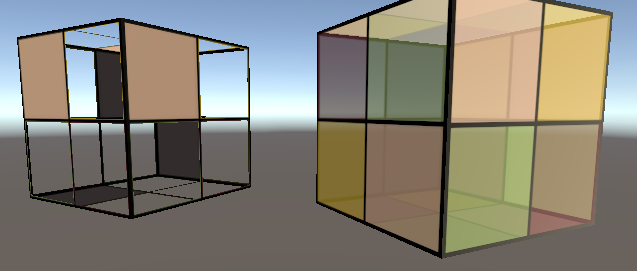
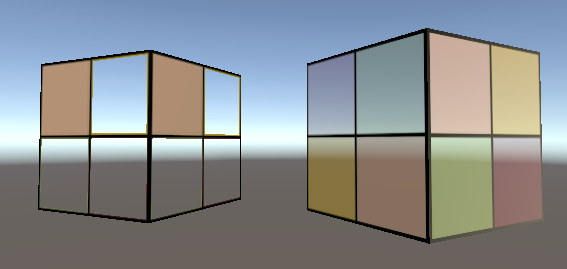 而双面渲染的透明效果 Shader 就是来处理这种问题的 我们不仅仅可以透过半透明物体看见其他物体,还可以看见自己的内部结构