透明测试
一、透明测试时用于处理哪些需求的
在游戏开发中 对象的某些部位完全透明而且其他部位完全不透明 这种透明需求往往不需要半透明效果 相对比较极端,只有看得见和看不见之分 比如草、树叶、栅栏···
二、基本原理
通过一个阈值来决定哪些像素应该被保留,哪些像素应该被丢弃
三、具体实现
片元携带的的颜色信息中的透明度(A 值)
- 不满足条件时:(通常是小于某一个阈值) 该片元就会被舍弃,被舍弃的片元不会再进行任何处理,不会对颜色缓冲区产生任何影响
- 满足条件时:(通常是大于等于某一个阈值) 该片元按照不透明物体的处理方式来处理
阈值判断使用的方法: 利用 CG 中的内置函数 Clip(参数) 参数类型可以是 float4 float3 float2 float 如果参数为负数 就会舍弃当前片元
clip 函数内部实现: 它的内部会用到一个 discard 指令,代表剔除该片元 不再参与渲染
1
2
3
4
5
| void clip(float4 x)
{
if(any(x<0))
discard;
}
|
四、示例代码
1.实现步骤
- 实现颜色纹理结合光照模型的 Shader
- 在属性中加一个阈值 _Cutoff 取值范围为[0,1],用来设定判断的阈值,并在 CG 中添加属性的映射成员
- 将渲染队列设置为 AlphaTest,并配合 IgnoreProjector 和 RenderType 一起设置
- 在片元着色器中获取了颜色贴图后,就进行阈值的判断
2.实现代码
1
2
3
4
5
6
7
8
9
10
11
12
13
14
15
16
17
18
19
20
21
22
23
24
25
26
27
28
29
30
31
32
33
34
35
36
37
38
39
40
41
42
43
44
45
46
47
48
49
50
51
52
53
54
55
56
57
58
59
60
61
62
63
64
65
66
67
68
69
70
71
72
73
74
75
76
77
78
79
80
81
82
83
84
85
86
87
88
89
90
91
92
93
94
95
96
97
98
99
100
101
102
103
104
105
| Shader "Unlit/AlphaTest"
{
Properties
{
_MainTex("MainTex",2D)=""{}
_MainColor("MainColor",Color)=(1,1,1,1)
_SpecularColor("SpecularColor",Color)=(1,1,1,1)
_SpecularNum("SpecularNum",Range(0,20))=15
_Cutoff("Cutoff",Range(0,1)) = 0
}
SubShader
{
Tags{"Queue" = "AlphaTest" "IngnoreProject"="Ture" "RenderType" = "TransparentCutout"}
Pass
{
Tags{"LightMode"="ForwardBase"}
CGPROGRAM
#pragma vertex vert
#pragma fragment frag
#include "UnityCG.cginc"
#include "Lighting.cginc"
sampler2D _MainTex;
float4 _MainTex_ST;
fixed4 _MainColor;
fixed4 _SpecularColor;
float _SpecularNum;
fixed _Cutoff;
struct v2f
{
float4 pos:POSITION;
float2 uv:TEXCOORD0;
float3 wNormal:NORMAL;
float3 wPos:TEXCOORD1;
};
v2f vert (appdata_base v)
{
v2f data;
data.pos = UnityObjectToClipPos(v.vertex);
data.uv = v.texcoord.xy *_MainTex_ST.xy + _MainTex_ST.zw;
data.wNormal = UnityObjectToWorldNormal(v.normal);
data.wPos = mul(UNITY_MATRIX_M,v.vertex);
return data;
}
fixed4 frag (v2f i) : SV_Target
{
fixed4 texColor = tex2D(_MainTex,i.uv);
clip(texColor.a-_Cutoff);
fixed3 albedo = tex2D(_MainTex,i.uv).rgb * _MainColor.rgb;
float3 lightDir = normalize(_WorldSpaceLightPos0.xyz);
fixed3 lambertColor = _LightColor0.rgb * albedo.rgb *max(0,dot(i.wNormal,lightDir));
float3 viewDir = normalize(UnityWorldSpaceViewDir(i.wPos));
float3 halfA = normalize(viewDir + lightDir);
fixed3 specularColor = _LightColor0.rgb * _SpecularColor * pow(max(0,dot(i.wNormal,halfA)),_SpecularNum);
fixed3 color = UNITY_LIGHTMODEL_AMBIENT.rgb * albedo.rgb + lambertColor + specularColor;
return fixed4(color.rgb,1);
}
ENDCG
}
}
}
|
3.实现效果
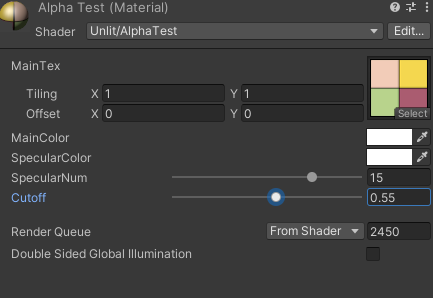 2024-09-11 165033.png
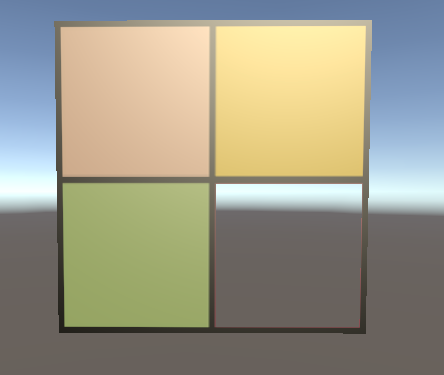 2024-09-11 165027.png




